Guide · Scheduling basics
How to Know Which Tasks Can Delay Your Project
Understand critical paths, task dependencies, and schedule float — and see what really drives your delivery date.
A project plan may contain hundreds of tasks, but not every task has the same impact on delivery.
Some activities can slip by several days without changing the project completion date. Others can delay a key milestone immediately.
The challenge is knowing which is which.
That’s where the Critical Path Method (CPM) becomes useful.
Why task completion percentages aren’t enough
Consider a project with these activities:
| Activity | Duration | Depends on |
|---|---|---|
| Complete development | 10 days | — |
| Integration testing | 5 days | Development |
| Prepare documentation | 3 days | Development |
| User acceptance testing | 5 days | Integration testing |
| Go Live | 0 days | UAT, Documentation |
Assuming a simple working calendar with no additional constraints, the development → integration testing → UAT → go-live sequence determines the earliest completion date.
Documentation can finish later than originally planned without necessarily affecting go-live.
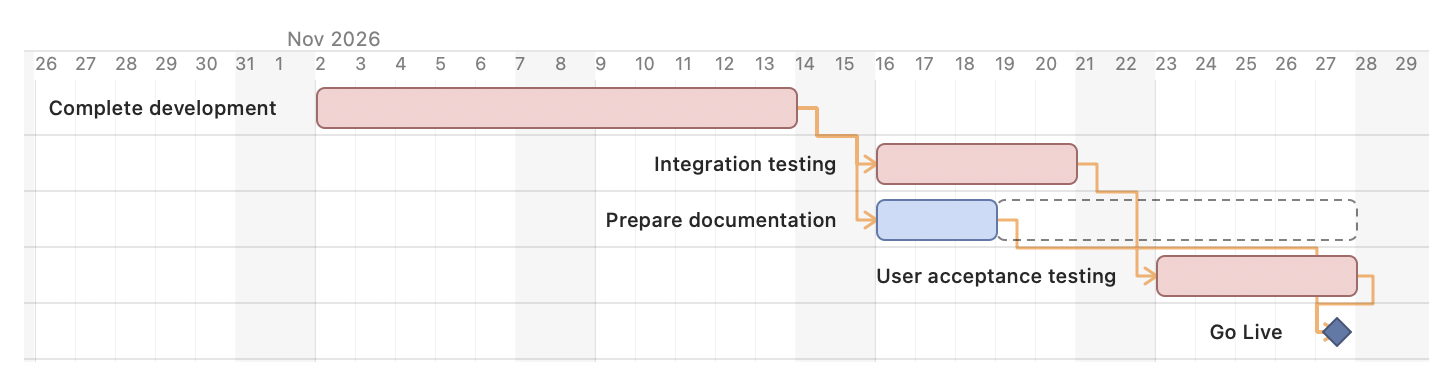
The same example scheduled in FlexiGantt. The critical path is highlighted in red. Prepare documentation has seven working days of float, shown as the dashed bar.
That difference matters when deciding where to spend time resolving delays.
What is the critical path?
The critical path is the longest duration path through the dependency network, under the assumptions of a simple unconstrained schedule.
Activities on that path determine the earliest possible project completion.
If a critical activity is delayed and nothing else changes, the completion date is likely to move.
Activities outside the critical path may have scheduling flexibility, commonly called float or slack.
Total float vs. free float
Total float measures how long an activity can be delayed without affecting the relevant project completion boundary.
Free float measures how long an activity can be delayed without delaying an immediate successor.
Both are useful, but they answer different questions.
For example, a task may have five days of total float but zero free float. Delaying it would move its successor, even if the final project date remained unchanged.
How to analyze your project schedule
1. Identify your delivery milestones
Start with the commitments that matter: release dates, customer acceptance, migration windows, or go-live.
2. Connect activities with dependencies
Define which tasks must finish before others can begin.
A schedule without dependencies is primarily a visual timeline. Dependencies make it possible to calculate the consequences of changes.
3. Calculate the critical path
Use a CPM scheduling engine to identify the activities driving completion.
4. Examine remaining float
Pay attention to activities with little or no scheduling flexibility.
These are often the places where a small delay can become a delivery problem.
5. Update the schedule when reality changes
When durations, dependencies, or constraints change, recalculate the schedule.
The critical path can change as the project progresses.
See schedule dependencies with FlexiGantt
FlexiGantt is a local-first macOS project planning application designed to make delivery schedules easier to understand.
With FlexiGantt, you can:
- Build a hierarchical project plan with tasks and milestones.
- Connect activities using scheduling dependencies.
- Calculate dates and identify the critical path.
- Examine total and free float.
- See how schedule changes affect downstream work.
- Work with local project files without requiring a cloud account.
The aim is simple: make it easier to understand what drives your delivery date and how much flexibility remains.
Plan your next delivery with confidence
Whether you’re coordinating a software release, an implementation, or a customer rollout, a dependency-based schedule helps you move beyond task status.
Instead of asking only “How much work is complete?”, you can ask:
“What could still delay our delivery?”